

Changing your managed IT provider is more straightforward than most business owners expect. The process typically takes four to six weeks, involves transferring documentation and access credentials, overlapping your old and new providers briefly during handover, and onboarding your team with the new provider. The biggest risk is not the technical transition itself — it is poor planning around access, contracts, and data ownership.
If your current provider is underperforming, unresponsive, or simply not the right fit for where your business is heading, you do not have to stay. This guide walks through everything you need to know before, during, and after the switch.
The most common reasons businesses decide to switch managed IT providers include:
Switching providers doesn’t have to be disruptive. With the right preparation, most businesses complete the transition with minimal downtime and notice an improvement quickly.
Before contacting your current provider, take care of a few things first.
Check your existing agreement for:
If you are unsure about any clause, it is worth a quick review before you proceed.
Start pulling together what you know about your IT environment:
You may find some of this information is held entirely by your current provider. That is something your new provider will help you recover during onboarding.

Use this checklist to track what needs to happen during any managed IT provider transition:

Notify your current provider in writing within the terms of your contract. Keep the communication professional — you may still need their cooperation during the handover period.
Start the onboarding conversation with your new provider as soon as possible. A good provider will begin an environment discovery process before the formal start date so there are no surprises.
Ask your current provider for a full handover pack including network documentation, asset registers, software licence keys, admin credentials, and any backup details. Reputable providers will supply this — it is your information.
Where possible, allow a short overlap period (one to two weeks) where both providers have visibility. This isn’t always practical but reduces the risk of anything falling through the cracks during the transition.
On or after the final day with your current provider, your new provider will take full control of admin accounts, monitoring tools, and security platforms. Your old provider’s access should be removed completely at this point.
Your team needs to know who to call, how to log a support ticket, and what to expect from the new provider. A brief introduction from management and a simple one-page guide goes a long way.
Data ownership is one of the most important things to clarify before you switch. Your data belongs to you — not your IT provider. This includes:
Request these in writing before your final day. If a provider refuses to hand over your documentation, that is a significant red flag and you may need to seek advice on your rights under the contract.
Your new provider will typically run their own onboarding audit, which will identify any gaps in documentation and establish a fresh baseline for your environment.
For more on why proper documentation and asset tracking matters, see our article on IT Asset Management for Australian SMBs.
For most small to medium businesses, a managed IT provider transition takes four to six weeks from the time you give notice to the time your new provider is fully operational. The main factors that affect timing are:
In straightforward environments (10 to 30 users, cloud-first infrastructure), transitions can be completed in under three weeks. More complex environments with on-premises servers, custom applications, or multiple sites take longer.
A well-managed transition should involve no unplanned downtime. There may be brief scheduled maintenance windows to transfer monitoring agents, deploy new security tools, or update admin credentials — but these are planned in advance and communicated to your team.
The most common cause of disruption during a provider switch is missing credentials or undocumented systems that create delays. This is why the documentation request in Stage 3 is so important.
Switching providers is only worth doing if your next choice is genuinely better. Before committing, make sure your new provider can answer these questions clearly:
A good IT provider will welcome these questions. If any of them are avoided or answered vaguely, that tells you something important.
For a detailed breakdown of what a comprehensive managed service should include, see our guide on What to Look for in a Managed IT Provider.
You might also find our MSP vs In-House IT cost comparison useful if you’re reassessing the whole model.

Netlogyx has onboarded businesses that have come from a wide range of situations — from providers that went quiet to contracts that simply ran their course. Here is how we approach it:
We understand that switching providers involves some level of trust. We aim to earn that quickly by being organised, communicative, and transparent from the very first conversation.
If you’d like to understand what our managed IT service includes day-to-day, see our Monitoring and Maintenance page and our IT Support Gold Coast page.
If you’ve been thinking about changing providers for a while, the process is probably less complicated than you’re imagining. A conversation with Netlogyx costs nothing and will give you a clear picture of what’s involved for your specific situation.
Book a free discovery session with Netlogyx and we’ll walk you through exactly what a transition would look like for your business — no pressure, no obligation.
(We are not looking to replace your current provider, just offering an alternative perspective.)
No. Your data, documentation, and systems belong to you. A reputable provider will hand over all documentation and credentials as part of the offboarding process. If a provider refuses, you have grounds to pursue the matter through your contract terms or seek legal advice.
You are not obligated to explain your reasons, but professional communication tends to result in a smoother handover. Giving proper notice and keeping the relationship professional is in your best interest during the transition period.
This is more common than it should be. Your new provider can work through the process of recovering admin access to your domain, Microsoft 365 tenant, and network equipment. It may take slightly longer but it is resolvable in almost all cases.
A brief overlap is actually the safest approach. It allows the incoming provider to complete their onboarding audit while the outgoing provider is still accountable. Access should be carefully managed — your new provider should not receive admin credentials while your old provider still has full access.
Onboarding is included as part of becoming a Netlogyx managed IT client. There is no separate fee for the transition itself. Book a session to discuss pricing for your specific environment. [REVIEW REQUIRED: Confirm onboarding fee policy with Netlogyx before publishing.]
Start with a no-obligation discovery session. We’ll assess your current environment, explain what we would do differently, and give you a clear proposal. If it doesn’t feel right, you’re under no obligation to proceed.
Written by Neil Frick, Netlogyx. Last reviewed: September 2026.
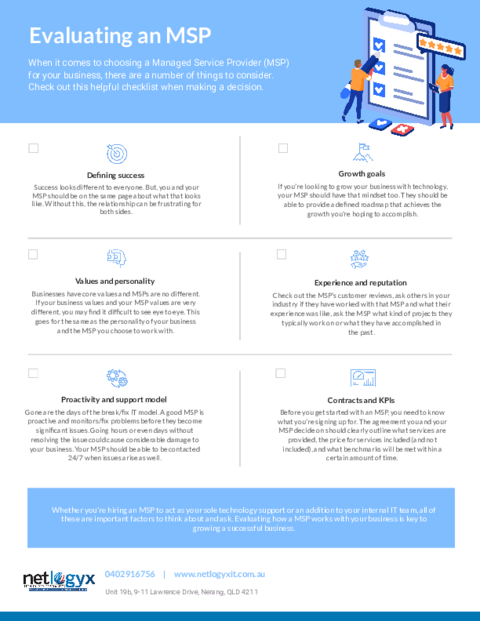
Free Netlogyx resource
Compare potential providers and plan a smooth IT handover.
Get my free guide →Enter your name and email to access this resource. Marketing consent is optional.
Browse all free IT guides