
• Home
  • About us
  • Services

    Business Support

    • Monitoring and Maintenance
    • Business Continuity
    • Remote Support
    • IT Support
    • Cloud Computing
    • AI Workflows Reviews

    Cyber Security

    • CISSP Gold Coast
    • Netlogyx Threat Locker
    • Office 365 Backup
    • Penetration Testing
    • Security Awareness Training
    • Sentinelone
    • SIEM
    • Vulnerability Management
    • Soc 2 Compliance
    • Business Cyber Security Policies
    • CrowdStrike Ultimate Protection Suite
    • Google Workspace Audit
    • Microsoft 365 Audit

    Useful Links

    • Shop.netlogyxit.com.au
    • Refurbished Hardware
    • Office 365
    • Remote Working Support
  • Pricing
  • Blog
  • Free IT Guides
  • Support
  • Shop
  • Home
  • About us
  • Services

    Business Support

    • Monitoring and Maintenance
    • Business Continuity
    • Remote Support
    • IT Support
    • Cloud Computing
    • AI Workflows Reviews

    Cyber Security

    • CISSP Gold Coast
    • Netlogyx Threat Locker
    • Office 365 Backup
    • Penetration Testing
    • Security Awareness Training
    • Sentinelone
    • SIEM
    • Vulnerability Management
    • Soc 2 Compliance
    • Business Cyber Security Policies
    • CrowdStrike Ultimate Protection Suite
    • Google Workspace Audit
    • Microsoft 365 Audit

    Useful Links

    • Shop.netlogyxit.com.au
    • Refurbished Hardware
    • Office 365
    • Remote Working Support
  • Pricing
  • Blog
  • Free IT Guides
  • Support
  • Shop
Help Me

CALL NOW: 1300044320

  • About Us
  • Services
  • Help & FAQs
  • Contact
  • Terms
  • Privacy
  • About Us
  • Services
  • Help & FAQs
  • Contact
  • Terms
  • Privacy

Office 365 For Business – Gold Coast IT Solutions

  • Home
  • Blog Details
  • June 20 2018
  • Neil Frick

OUTLOOK

The email service, task management, calendar application, and contacts manager included with business Office 365 subscriptions are under the Outlook branch of the web brand. It includes Outlook Mail, Outlook Calendar, Outlook People, and Outlook Tasks.

Microsoft also introduced an email feature called Clutter with Office 365. Clutter memorises user’s preferences regarding relevance and importance of their emails. It analyses the user’s pattern of behaviour about email subjects, if user keeps ignoring emails from a certain sender or subject, Clutter files those emails to a folder with the same name in Outlook.

HOSTED SERVICES

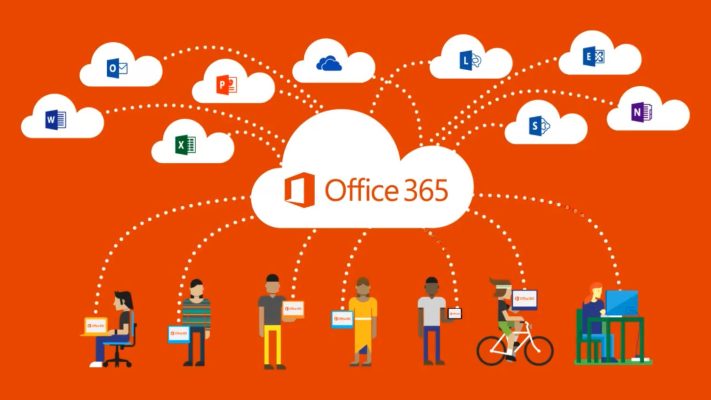
The business plans for Office 365 offer access to cloud-hosted versions of Office’s server platforms on a software as a service basis, which include Exchange, Skype for Business, SharePoint, and the browser-based Office Web Apps suite. The SharePoint’s OneDrive for Business program provides each user with 15 GB of online storage.

image
image
image

OFFICE APPLICATIONS

Some plans for Office 365 do also include access to current versions of the Office desktop applications for both Windows and OS X for the duration of their subscription. For Office 2016 on Windows, it is installed using a “click-to-run” system which allows users to begin using the applications almost immediately while files are streamed in the background. All updates to the software are installed automatically, this includes both security updates and major new versions of Office. If an Office 365 subscription lapses, the applications become read-only and the editing functionality is disabled. Full functionality is restored when the new subscription is purchased and activated.

COLLABORATION TOOLS

Office 365 includes several productivity applications that are designed to cover collaboration needs at the organizational, departmental and team levels. Currently, the list of collaboration tools includes OneDrive for Business, SharePoint Online, Microsoft Teams, Yammer, Skype, Outlook Online and Delve boards.

There are several approaches to defining the role of Office 365 collaboration tools in an organization. The main considerations that influence the choice of a certain tool depend on communication needs, team size, project specifics, and keeping in mind the employees’ personal preferences. Depending on what you need to do, each collaboration tool suits a work situation. SharePoint Online is often used as a platform for corporate intranets and portals, much the same way as SharePoint On-Premises does.

At the same time, SharePoint Online comes not only with team sites but also with communication sites and hub sites. Microsoft Teams allow collaboration channels for public and private communication, as well as voice and video conferences. Outlook Online hosts email-based collaboration. Yammer is used for communication with business users outside of the organization and enables forum style team communication. Skype for Business supports instant messaging, VoIP, audio, video and web conferencing. As for Delve boards, they allow creating boards to group together and share related documents.

Additionally, there are Office 365 Groups that represent rather a technological capability within the suite than a tool apart. Office 365 Groups allow creating separate collaboration spaces in other Office 365 tools. An Office 365 Group can be organized in Outlook, SharePoint Online, Yammer, Microsoft Teams and other collaboration tools to diversify the native collaboration capabilities of these applications. For example, if a team collaborates in a Group in Yammer, its members automatically get a team calendar, a shared Outlook inbox, a SharePoint library, a SharePoint team site, a shared OneNote notebook and Planner.

UPDATES

The Office 365 platform have implemented a rolling release model; updates to the online aspects of the service are provided once every quarter.

Previous Post
How To Grow Your Business Using Big Data And Analytics
Next Post
Improving Productivity In The Workplace – The Ultimate 8 Step Guide

Leave a Comment Cancel reply

Recent Posts

  • Cybersecurity Training for Teams: Essential in Gold Coast
  • Are Your Firewalls Enough? Gold Coast SMB Insights
  • How to Secure Your Gold Coast Business
  • Understanding Cybersecurity Legislation for Gold Coast SMBs
  • Cyber Hygiene: Essential Practices for Gold Coast SMBs

Archives

  • October 2026
  • September 2026
  • August 2026
  • July 2026
  • June 2026
  • May 2026
  • April 2026
  • March 2026
  • September 2025
  • August 2025
  • July 2025
  • June 2025
  • January 2025
  • December 2024
  • November 2024
  • August 2024
  • June 2024
  • April 2024
  • March 2024
  • February 2024
  • January 2024
  • December 2023
  • November 2023
  • October 2023
  • September 2023
  • August 2023
  • July 2023
  • June 2023
  • May 2023
  • April 2023
  • March 2023
  • February 2023
  • January 2023
  • December 2022
  • November 2022
  • September 2022
  • August 2022
  • July 2022
  • June 2022
  • May 2022
  • April 2022
  • March 2022
  • December 2021
  • November 2021
  • October 2021
  • September 2021
  • August 2021
  • July 2021
  • June 2021
  • May 2021
  • April 2021
  • March 2021
  • February 2021
  • January 2021
  • December 2020
  • November 2020
  • October 2020
  • September 2020
  • August 2020
  • March 2020
  • February 2020
  • January 2020
  • December 2019
  • November 2019
  • October 2019
  • September 2019
  • July 2019
  • June 2019
  • May 2019
  • April 2019
  • March 2019
  • February 2019
  • January 2019
  • December 2018
  • November 2018
  • October 2018
  • September 2018
  • August 2018
  • July 2018
  • June 2018
  • May 2018
  • April 2018
  • March 2018
  • February 2018
  • January 2018
  • December 2017
  • November 2017
  • October 2017
  • September 2017
  • March 2017
  • November 2016
  • October 2016
  • March 2015
  • February 2015
  • January 2015
  • December 2014
  • November 2014
  • September 2014
  • August 2014

Categories

  • Business Continuity 26
  • Business Protection 21
  • Business Risk Management 16
  • Business Security 51
  • Business Technology 3
  • CISSP 2
  • Cloud Computing 9
  • Cloud Security 3
  • Compliance 9
  • Computer Repair 11
  • Cyber Security 130
  • CyberSecurity 38
  • dark web monitoring 1
  • data backup disaster recovery, 3-2-1 backup rule, RTO RPO, Microsoft 365 backup, business continuity Australia, ransomware backup, managed IT Gold Coast, SMB data protection, cloud backup Australia 1
  • Data Breaches 7
  • Defence Industry 1
  • Desktop Support Service 3
  • Education 2
  • Email Security 5
  • Firewall 2
  • Healthcare IT 1
  • IT Services 27
  • IT Solutions 16
  • IT Support 54
  • Legal and Regulatory 3
  • Managed IT Services 22
  • Managed Services 17
  • Manufacturing 1
  • Network Security Audit 22
  • OT Security 1
  • Products and Services 1
  • Risk Management 9
  • Security 12
  • Security Training 7
  • SMB Security 38
  • SOC 2 compliance 2
  • Supply Chain Security 4
  • Technology 1
  • Uncategorized 19

Tags

ACSC ACSC Essential Eight antivirus ASD Essential Eight business continuity business email compromise Business Risk Management CEO fraud cloud security credential security credential stuffing CrowdStrike Falcon Complete CrowdStrike MDR cyber incident response cyber insurance cyber risk management Cybersecurity cybersecurity awareness training cybersecurity framework Australia cybersecurity Gold Coast Brisbane cybersecurity SMB dark web monitoring data breach DMARC endpoint security Australia Essential Eight Essential Eight compliance Falcon Discover Falcon Spotlight Gold Coast IT Gold Coast IT security IT hygiene managed detection response Australia managed IT Gold Coast MFA MFA Australia Microsoft 365 backup multi-factor authentication network security outsourced IT department patch management phishing-resistant MFA SMB cybersecurity vendor risk vulnerability management SMB
We will always explain to you the problem and how it impacts your business, possible fixes and our recommendation.

Business Support

  • Monitoring and Maintenance
  • Business Continuity
  • Remote Support
  • IT Support
  • Cloud Computing

Cyber Security

  • CISSP Gold Coast
  • Netlogyx Threat Locker
  • Office 365 Backup
  • Penetration Testing
  • Security Awareness Training
  • Sentinelone
  • SIEM
  • Vulnerability Management
  • Soc 2 Compliance
  • Business Cyber Security Policies

Useful Links

  • Shop.netlogyxit.com.au
  • Refurbished Hardware
  • Office 365
  • Remote Working Support

Contact Info

  • unit 19b 9-11 Lawrence Drive Nerang Qld 4211
  • sales@netlogyx.com.au
  • 0755201211
© Copyright 2026 Netlogyxit®. All Rights Reserved – Designed by Friendsco Tech.
  • Home
  • About
  • Contact
  • Privacy
  • Terms